The post How to Write an Effective Application for Salary Increment – Tips and Examples appeared first on BDClass.
]]>How to Write an Application for Salary Increment
To write a salary increment application, follow the simple guide.
1. Write the Date and Correct Address
At the very first, write the date on the top of the application. Then write the correct address to whom you are writing the letter.
2. Add a Subject Line
Now write the subject of the letter. The subject line tells the reader the core topic of the letter. Here you can simply write, “Subject: Application for a Salary Increment.”
3. Give a Salutation:
Begin the letter by addressing the person in charge. It is good to start with “Dear Sir” or Dear [Name]”
4. State the purpose of the application:
In the first paragraph, clearly state the purpose of your application. This will help the reader understand the purpose of the letter immediately.
5. Justify the reason to increase your salary:
In the second paragraph, explain why you believe you deserve a raise. This could be based on your work performance, additional responsibilities you have taken on, or your level of experience and education.
6. Provide specific examples:
To support your claims, provide specific examples of your work accomplishments, projects you have successfully completed, positive feedback you have received, or any awards or recognitions you have earned.
7. Be realistic
When requesting a raise, it is important to be realistic and considerate of the company’s financial situation. Research industry standards and comparable salaries to ensure that your request is reasonable and in line with your position and level of experience.
8. Conclude the letter professionally
Thank the reader for their consideration and express your willingness to discuss the matter further. Close the letter with a professional sign-off, such as “Sincerely” or “Best regards.”
You may like: 10 Powerful Tips for Mastering Online Job
Example of Salary Increment Application
Date: 28 March 2023
[Senior Authority Name]
[Position]
[Organization Name]
[Address]
[City, State ZIP Code]
Subject: Application for Salary Increase
Dear Sir/Madam
I am writing to formally request an increase in my salary. As a [Your Position] at [Organization Name], I have proudly contributed to the organization’s success for [Number of years worked] years. During this time, I have consistently proven myself to be a valuable and dedicated member of the team.
Throughout my tenure, I have taken on additional responsibilities and have played a significant role in the organization’s growth. I have exceeded expectations, received positive performance evaluations, and have been recognized for my contributions to the company.
However, despite my dedication and hard work, my salary has remained stagnant since my employment began. Given my substantial contributions and the rise in the cost of living, I believe that an increase in my salary is both warranted and necessary.
I am confident that my contributions to the organization justify an increase in compensation, and I kindly request that you take this into consideration. I am passionate about continuing to contribute to the growth and success of the organization, and I believe that a salary increase will demonstrate your confidence in my abilities and dedication.
Thank you for your time and consideration.
Sincerely,
[Your Name]
Frequently Asked Questions
To write an application for a salary increment, find a sample application letter online first. Then edit the letter and place all your information in it. This is a simple process and you can rely on any sample letter to write your own application.
You can request a salary increment by writing a salary increment letter or email to your employer or manager. Show your hard work, performance, and role in the growth or success of the organization
The post How to Write an Effective Application for Salary Increment – Tips and Examples appeared first on BDClass.
]]>The post 10 Powerful Tips for Mastering Online Job appeared first on BDClass.
]]>More businesses could decide to use video conferencing software while conducting job interviews. This is due to preliminary screening interviews for remote roles frequently making better use of it.
However, you must consider a few aspects of this form because it differs slightly from conventional in-person interviews.
In this post, we define a video interview and provide some preparation recommendations for your online interview session.
How do I master a virtual interview?
1. Activate the Mute Icon.
This function is fantastic to employ when your employer is talking for extended stretches. They are unable to listen to you when you use the mute key. This is helpful if your home is filled with loud noises like kids playing or animals shouting. Your employer may feel more concentrated if you remain silent while they talk and listen just to what they’ve to say.
2. Look into the Webcam
Maintaining eye contact with the employer displays regard and assurance throughout an in-person meeting. This is slightly different with video chat since, even if you choose to stare someone in the eyes on your display, it might not appear that way to them. So instead, while speaking, direct your gaze at the lens. The appearance that you are gazing at them instead of you or the computer is created by doing this.
3. Select a Professional Backdrop
Pick a spot that is organized and clutter-free while adjusting your computer. Ensure the objects in your backdrop are all professional-looking & minimalist rather than cluttered. It demonstrates your organization and care for detail to arrange a bare wall or just a few stylish decorations.
4. Locate A Well-Lit Space
Throughout your interview, the interviewer must be capable of observing your movements and facial responses. Pick a well-lit area where they can view you well. Setting up your meeting, so it faces a window with a lot of sunlight is a terrific approach to stand out. When you stand in front of a window, your face will be thrown in shadow, giving the impression that you are a silhouette.
5. Turn Off Your Cell Phone
Silence the cell phone and set it aside before your interview. In this manner, you can concentrate on the discussion instead of a text or call. It could be a great idea to turn off your cell phone about 10 minutes before your meeting, so you have time to relax and concentrate on your preparation.
6. Retain Your Attention
Maintain your attention on the display as your interviewer speaks. Demonstrate to them via effective listening that you’re interested in what they offer, just as you might in a face-to-face interview. You may accomplish this by responding with a nod while they talk, confirming what they speak, and formulating questions in response to their answers.
Another tip is using a call recording app such as the best Call Recorder for iPhone to record calls. So, download it today because it’s free!
7. Charge Up Your Laptop
During your interview, ensure your computer is fully charged if the interview location lacks an electrical outlet. The ideal location for your interview must allow you to keep your laptop plugged in the whole time. Your device will survive the duration of the chat if you do this.
8. Locate A Reliable Internet Connection.
Verify that you possess a reliable internet connection before your interview. Check your connectivity and the seat you intend to use for the discussion. You’re more likely to establish a strong relationship in your interview if you can stream live or consult with others.
9. Pose Inquiries to Your Interviewer
Make a mental track of the queries you would like to pose at the conclusion of the meeting when you know about the position. In order to ensure that you have concerns to address during the encounter, you may also study them beforehand. Then, during the interview, pay close attention so that you ask any questions on subjects that the employer hasn’t previously discussed. Suitable inquiries involve:
- Can you describe in more detail the daily duties of this position?
- What would you say about the corporate culture?
- What about partnering here that you enjoy best?
10. Play A Test Files on Your Computer
Modern technology may be intimidating, so you should feel comfortable utilizing any approach your potential employee wants while doing online interviews in particular. It’s a good practice to test your Wi-Fi connection and sound and audio abilities after you’re familiar with the application you’ll use to ensure everything is functioning correctly. Additionally, ensure the location has adequate illumination so the interviewer can see you perfectly.
Conclusion
Don’t overthink things! Since they cut the organization’s effort and money, internet conferencing is frequently employed during the initial round of applicant interviews. They support achieving parity for candidates. The great news is that the following stage will (most likely) include an in-person interviewing, allowing you the opportunity to fit your potential employer in reality.
The highlight of an electronic interview, then? No need to be concerned about a firm handshake!
The post 10 Powerful Tips for Mastering Online Job appeared first on BDClass.
]]>The post How to Introduce Yourself in a Job Interview appeared first on BDClass.
]]>Job interviews are mostly taken to check the personality, skills and confidence of the applicants. An interview works like a bridge between the employer and the applicant. A good interview can help a job seeker even to secure a better position in his/her chosen field.
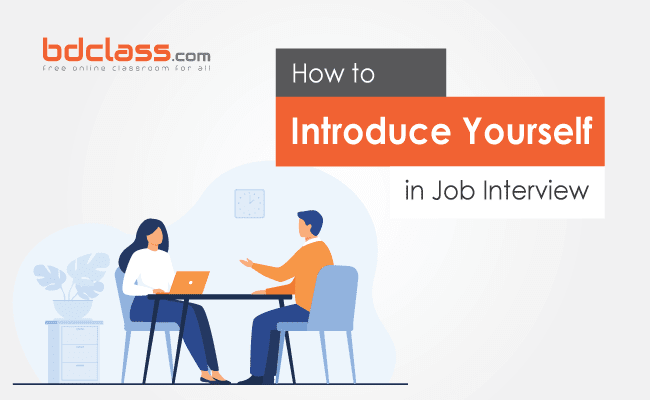
Here I discussed the most relevant topics asked and should you behave in an interview.
Introducing yourself
It sounds the most difficult and easy question of all time. Especially when it is asked in a formal setting by a group of strangers. So Let’s discuss why this question appears in every interview and why is it so important.
Introduce yourself, walk me through your background, let us know about you a little more all these imperative sentences depicts the same meaning that we are discussing.
This question often gets tricky because they already know everything about us so why are they asking it or what they are actually looking for? They ask this question for two super important reasons.
- Firstly they want to know what kind of a person you are, especially your attitude towards work.
- Secondly, they want to see are you a good choice for them and what can you contribute best to their company.
So, They’ve already met or going to meet hundred more applicants like you. Now that’s your best chance to catch their attention and prove that you are the best suit for them.
So here goes the introduction process.
Make an Impression before Saying Something
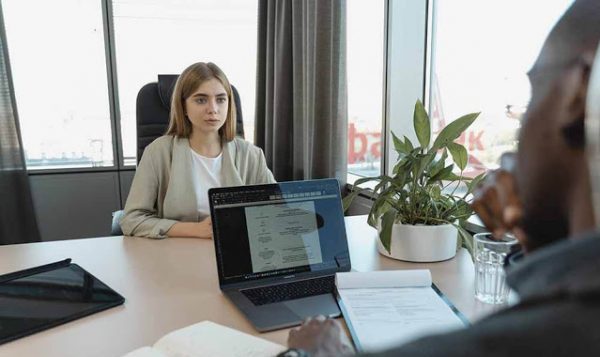
Your first impression is very important. Interviewers try to read you at first sight when you enter the room. It is always said non-verbal communication decides much whether you will be selected or not. So try to look like a confident person. Some tips can be the following;
- Nothing can beat a well-groomed interviewee.
- Personal hygiene – regardless of whether the recruiters can see/feel/smell or not is irrelevant – is important. It gives you a personal high.
- You are what your body is doing when you are talking. And non-verbal communication contributes to almost 60-90% of your personality impact. Work on that.
- Greeting- A formal greeting at starting is always commendable. Such as – Good morning ( before 12pm), good afternoon (12pm-4.30pm), good evening (4.30pm-midnight).
- Smile and give them a firm handshake but don’t grip their hand too strongly.
- Avoid fumbling and using informal words. Maintain a happy face and gentle eye contact.
Have Your Introduction Pre-Ready
Most of the time interviewers ask you to start by introducing yourself. So it is better to have a ready answer for this question.
But you must not memorise but have some broad points in your mind. Here is the list you must include in your introduction.
- Ask yourself what people don’t know about you, what you are currently doing good
- Tell about what is special in you. You can tell about any special event where you have a good impact.
- Don’t forget to tell some important information about yourself.
- Don’t include any unnecessary information that is already in your CV.
You may read- 10 Common Mistakes in your CV
Name
you should say your full name Proudly. Like- I’m Rohan Chowdhury or my name is Rohan Chowdhury. Avoid saying Mr or Ms before your name and you must enunciate your name clear.
Qualification
Describe why you are qualified for this job or why are you appropriate for it? Now, this part has two different kinds of answers. One for experienced and another one for freshers.
- Experienced – if you have previous job experience then share it with them. Such as – your position, company or institution name, years of experience, your impact of that etc. For example – I’ve been working as a sales admin or Blah blah…, I used to look after (explain your duties there), i was able to ( contribute, bring a good change, win best man award) there. Some attitude rules to maintain here are- Don’t be so overpowering about your previous achievements, Don’t fake anything and give an extra and above version of your CV.
- Freshers– So if you Don’t have any previous experience you really have to give an attractive answer. For example – I’m a recent MBA from blah blah. If your school or College is not that popular u can skip that. But this Isn’t enough. Add some stories of your achievements, tell them about the projects you were a part of, pieces of training that you took, and courses relevant to that job you applied for. You can avoid pieces of information about your CGPA as It’s already mentioned in your CV.
Skills
Skills that you’ve gained from your projects or courses can be a plus point. For Example – I’ve completed a graphic designing course or computer programming course, I’m proficient in Digital Marketing (should be relevant for their job).
Hobbies and Passions
If you think your passion or hobbies can a good impression then go for it. For example – I’m a trained singer, I often sing in the seminar, occasions to enlighten the atmosphere or I love staying fit. I eat healthily and exercise daily. It keeps me energetic and helps to maintain discipline.
Don’t tell about any strange or irrelevant hobbies that don’t suit your personality.
About Family (optional)
You may add it or avoid it based on the environment. But if you add it then give a very short but sounds complete kind of paragraph about your family.
Closing
Make two things clear to the employers at this point-
- Why do you apply here.
- Why you should be the right choice for the job.
For example – I love my current job but now I’m prepared for more challenges and duties. Your requirements for this job really excite me and I can make a good impact by joining here.
Or, you can show your research about their company, can talk about your future goals relating this job.
Use words from the job description and sound enthusiastic about your position. End your answer by saying that’s all from me, thank you.
So this is a standard way of introducing yourself in an interview.
Special Tips for Preparing your Introduction
You need some previous preparations before going for an interview. Here are some special tips for you.
- Write down your introduction following the rules written on top. Include the best selling points to grab their attention. But always keep in mind that the points should be relevant and approachable.
- You have to change and customize your script every time you prepare for a new interview.
- Don’t memories it word to word. Otherwise, You’ll sound like a robot and that will be visible in the interview which Isn’t a good impact.
- Don’t be so conscious about grammatical errors. Be a little spontaneous and comfortable.
- Answer the questions by looking at all of them, particularly for every question. Your answer should be around 1 minute approx.
- Always be ready for cross-questions. The interviewer often asks questions from your answers. Suppose, you told, you are the district champion in badminton. You may be asked to tell the names of a few world-known badminton players.
- Throughout the interview present yourself as a versatile, creative, team player, friendly, and confident person. It will increase their interest in you.
- Use words from the job description and sound enthusiastic about your position. End your answer by saying that’s all from me, thank you.
Coming to an end and putting all together good talking skills, polite appearance, and informative answers helps you a good distinction mark in a job interview.
Hope the post has helped you learn several new things. Here are some tips to avoid CV mistakes.
The post How to Introduce Yourself in a Job Interview appeared first on BDClass.
]]>The post 10 Common Mistakes You Must Avoid While Writing Your CV appeared first on BDClass.
]]>It is always seen, we are making our CV or Resume by editing the previously written CV of an older brother.
We go to any computer service providing shop and ask them to write a CV for us. How do you think this pre-ready CV can help you find a job.
I’d tell you this is the first mistake you are making. Let’s see what to avoid in writing a curriculum vitae.
Common Mistakes While Writing CV
1. Editing CV
Always write your Resume yourself. Don’t make it by changing or putting your name and details in anyone’s Resume.
Sometimes it so happens that some information about the previous person could remain in your CV. This is the first common wrong.
Don’t forget to keep font size, margin, and style the same. Choose a suitable font style for your CV. You shouldn’t use any unusual font. Make sure your spelling and grammar are 100% correct.
Use the most popular and best fonts for CV writing. Never use crappy or cursive fonts that are not easier to read. Using a good font can boost your chances of being called for an interview.
Many of us, prepare our Resume copying from others. We use many sentences without understanding. Be careful about that.
Writing your own modern resume template allows you to highlight your unique skills and experiences, and showcase your individual voice and personality. By doing so, you can increase your chances of standing out to potential employers and landing your desired job.
2. Number of Pages
A resume is not a place for practicing literature. Keep it short and clear. Don’t make your resume more than 2 pages if you are a fresher or experienced for 5-7 years. If you are experienced for 7-10/15 years, you can add one more page.
3. Information Order
Place important details at the first of the CV and then add less important things.
Suppose, personal details like father, mother, and religion, blood group is not necessary to your employer. An employer needs your contact details, education, qualification, and experience. So place these things at the beginning of the Resume.
When you are adding your educational details, list your last degree or course at first. If you have already completed your MBA, Show MBA at first, then BBA, then HSC, and at last SSC.
4. Adding Photo
Many use photos of college or university life. Sometimes they use low-resolution photos. If you are doing that you are not getting your job.
Always use very recent, high resolution, good and smiling photos. Don’t use selfie-style or any non-sense-type photo.
Don’t provide a loose photo with your CV. Add your photo on the right-top of the CV with a staple.
5. Contact Details
You should write contact details after your name. Only show your phone number, email address, and present address as contact details.
Add country code (+880) before the phone number. If you send your resume to a foreigner, how will he call you without a country code?
Don’t add non-sense type email addresses like [email protected], or [email protected], etc. Create a new email account with your proper name with any number or word.
Don’t show your permanent, home, or father-in-law’s address in contact details. You can show it in personal details.
6. Irrelevant Experience and Information
We often use the same Resume for different types of jobs such as Marketing, Sales, Admin, Production, Branding, and Accounts.
You should keep in mind that each type of job requires separate experience, qualifications. That’s why edit your CV and put the relevant experiences needed for your job.
As a fresher, you must add training and co-curricular activities. Show in which field you have expertise.
Sometimes, we write fishing, playing football or singing as our hobby. This doesn’t make sense. To me, this type of information should not go in your professional CV.
7. Useless Writing
Never write any useless things in your CV. Suppose, you have added your photo with your CV then why should you again write you are male or female?
How long your height, how many eyes or teeth you have these are useless for your job.
Don’t make a mistake writing about any skills that you don’t have.
You mustn’t show your present or expected salary there.
8. Over Decoration
Decorating is good but too much decoration with color and font style makes your resume bad. Always write your CV on white offset paper.
You may decorate your headings. Don’t use too many colors and graphic designs.
You shouldn’t make a table or a graph to show your skills. Write in a sentence.
9. Missing Social Profiles
Your employer can easily know about you by viewing your Facebook, Twitter, and Linkedin Profiles.
Create at least these 3 social network profiles today and add links in your contact details. Make sure you keep your profile name your real name. You better give your skype ID also.
The employer may find it easy to make conversation in chat. So you should have Whatsapp or Viber active on your phone.
10. Use of Wrong Words and Phrases
“Looking for a position, Looking for a good organization, Need, Seeking” these types of words show our weakness or inability.
Only show your ability, expertise, and willingness to do something better. Write something about why you should be hired.
For this, you can search Google and find some strong words and sentences about that.
However, A CV should be SMART. S for Specific, M for Measurable, A for Achievable, R for Realistic, and T for Time-bound.
And of course, You must put your signature, name, and date at the bottom of the CV.
Bottom Line
In conclusion, I would like to say that the employer doesn’t see you but sees your CV. So your CV should represent you.
All the above mistakes job seekers are doing commonly. So I have written to make you careful in writing a good CV for a job.
The post 10 Common Mistakes You Must Avoid While Writing Your CV appeared first on BDClass.
]]>The post 20 Most Popular and Best Fonts for CV Writing appeared first on BDClass.
]]>A good and correct font that is scannable and easier to read grabs the recruiter’s attention. It also tells about your personality and professionalism, which can help a recruiter know about you before he meets you.
On the other hand, a crappy font may be the only reason you are not getting the job.
So, never give them a reason to throw your CV into the dustbin using a font like Comic Sans.
Here are the most popular and best 20 fonts for your CV which can boost your chances of being called for an interview.
You may also read: Common Mistakes You Must Avoid in CV Writing
There are mainly four types of fonts:
Serif – fonts that have serifs aka small lines at the ends of characters (examples: Times New Roman and Baskerville)
Sans-serif – sans is French for ‘without’, meaning they don’t have serifs (examples: include Helvetica and Verdana)
Script – fonts that have modern or historical handwriting styles (examples: include Brush Script and Vivaldi)
Decorative – these fonts are characterized by unusual features like splash and pizzazz to a design. These types of fonts are used for design purposes. (examples: include ITC Matisse and Outlaw)
Let me say about the Script and Decorative Fonts. It doesn’t matter how cute or elegant the fonts look, they’re simply distracting and unreadable sometimes.
Now you are left with Serif and Sans-Serif fonts. Both of the fonts are easier to read and most commonly used in CV.
Let’s see the fonts and know more about them.
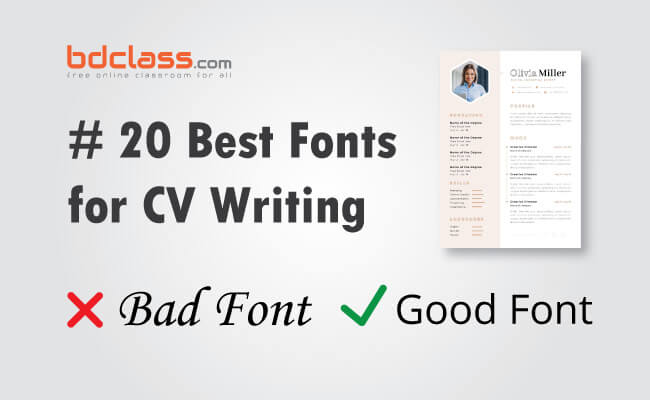
20 Best and Most Used Fonts for CV
These fonts are listed without any particular order. You can choose any of them according to your choice.
1. Calibri
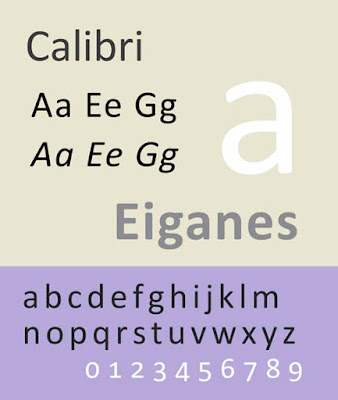
(Font type: Sans-Serif) Calibri has been added in Microsoft Word as the default font in 2007.
2. Helvetica
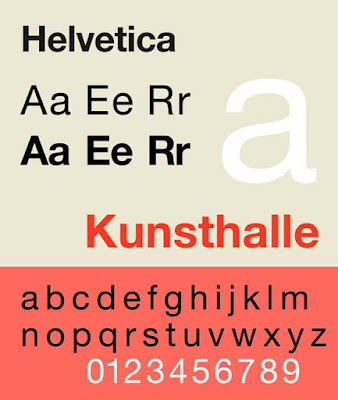
(Font type: Sans-serif) Helvetica remains a popular choice for many commercial wordmarks like Behance, Lufthansa and Skype. The font is widely used by the US and Canadian governments for its clean and professional appearance.
3. Gill Sans

(Font type: Sans-serif) Gill Sans is also a clear and professional-looking font. You can use this font for a CV without any thought.
4. Verdana

(Font type: Sans-serif) Verdana was released in 1996. Its name is a portmanteau of the word ‘verdant’ which means something green and Ana which is the name of the designer and painter Virginia Howlett’s daughter).
5. Tahoma

(Font type: Sans-serif) Tahoma was designed by Matthew in 1994. He was also the designer of Verdana. It is similar to Verdana in appearance but has a narrower body and tighter letter spacing than Verdana.
6. Lucida Sans

(Font type: Sans-serif) Lucida Sans was designed in 1985 as sister font type Lucida Serif. The font is best suitable for low-resolution displays due to its small size.
7. Franklin Gothic

(Font type: Sans-serif) Franklin Gothic is suitable for headlines rather than extended text. Nowadays, it maintains a high profile. Now it’s being used in a number of advertisements, newspaper headlines, books and billboards.
8. Trebuchet

(Font type: Sans-serif) Trebuchet was released in 1996 and named after the trebuchet which is a medieval siege engine. It was used as the default font for window titles in Windows XP.
9. Arial

(Font type: Sans-serif) Arial was designed in 1982 to be metrically identical to Helvetica so that a document written in Helvetica could be correctly displayed and printed without paying for a license.
10. Cambria

(Font type: Serif) Cambria is popular for its readability whether printed in small size, displayed on a low-resolution screen or even spacing and proportions.
11. Lato

(Font type: Sans-serif) The was designed by Polish designer Łukasz Dziedzic in the summer of 2010. The word ‘Lato’ means summer in Polish.
12. Corbel

(Font type: Sans-serif) Corbel has been described as a humanist sans-serif typeface. It was designed by Jeremy Tankard in 2005. The font is part of Microsoft’s ClearType Font Collection.
13. Avenir

(Font type: Sans-serif) Avenir is a premium font that was designed by Adrian Frutiger in 1988, who has described Avenir as his ‘finest work’. Avenir has been used by the city of Amsterdam as the primary font for its identity as well as by the Eurovision Song Contest.
14. Garamond

(Font type: Serif) Garamond is a timeless typeface and is named after Claude Garamond, a French type designer, His designs influenced many modern Garamond revisions.
15. Open Sans

(Type: Sans-serif) Perhaps, Open Sans is the most popular font type. It is used by many organizations and websites as their official font.
16. Goudy Old Style
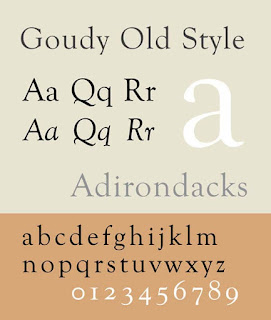
(Font-Type: Serif) This is a classic old-style font. It is described as a graceful typeface with a few balanced eccentricities. This font is particularly suitable for headings and titles.
17. Baskerville
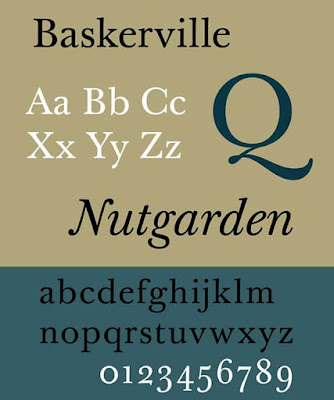
(Font type: Serif) Baskerville was designed in the1970s by John Baskerville, Baskerville is categorized as a transitional typeface. The font is included in some of Microsoft’s software.
18. Georgia
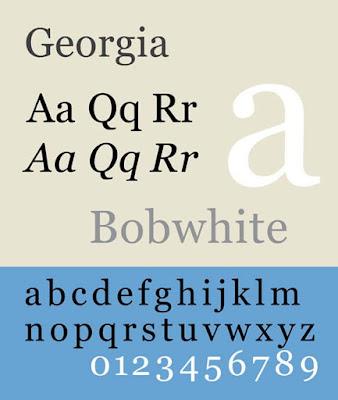
(Font type: Serif) The font was designed in 1993 for Microsoft.
19. Constantia
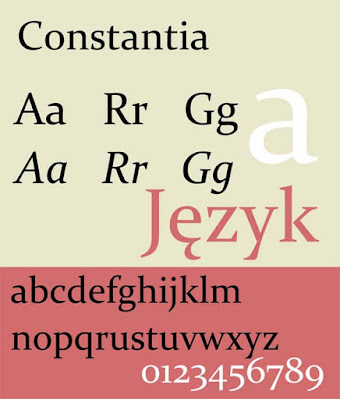
(Font type: Serif) This font was designed in 2003 for either print or on-screen uses, Constantia is part of the ClearType Font Collection including three other fonts of this list: Calibri, Cambria and Corbel.
20. Didot
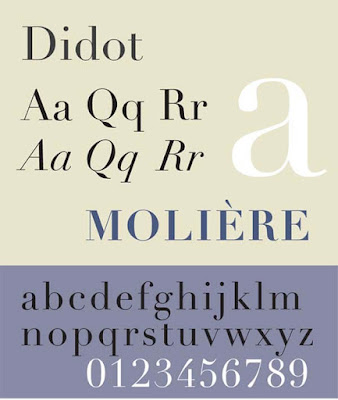
(Font type: Serif) Didot was first graced printed page back in 1784. You may use this for printed CV.
Hope you’ll find the post helpful. All the 20 fonts are most used by the professionals officially. You may use any of them without any thought.
Be safe and sound and remain with bdclass.com
The post 20 Most Popular and Best Fonts for CV Writing appeared first on BDClass.
]]>